

RIPPLEFX + SPOTIFY · IPHONE & IPAD

An equalizer for your Spotify sound.

Give Spotify a sound that feels like yours. With RippleFX selected as the audio output, you can fine-tune bass, shape frequencies and tailor compatible headphone playback—all while listening in Spotify.

Bass Boost8 & 16-band graphic EQHeadphone AutoEQSpatial Surround

7 days of full access. Then 10 minutes free every day. No automatic subscription.

Download on the App Store

Requires iOS 27 / iPadOS 27 or later. RippleFX is an independent app, not affiliated with the named streaming service.

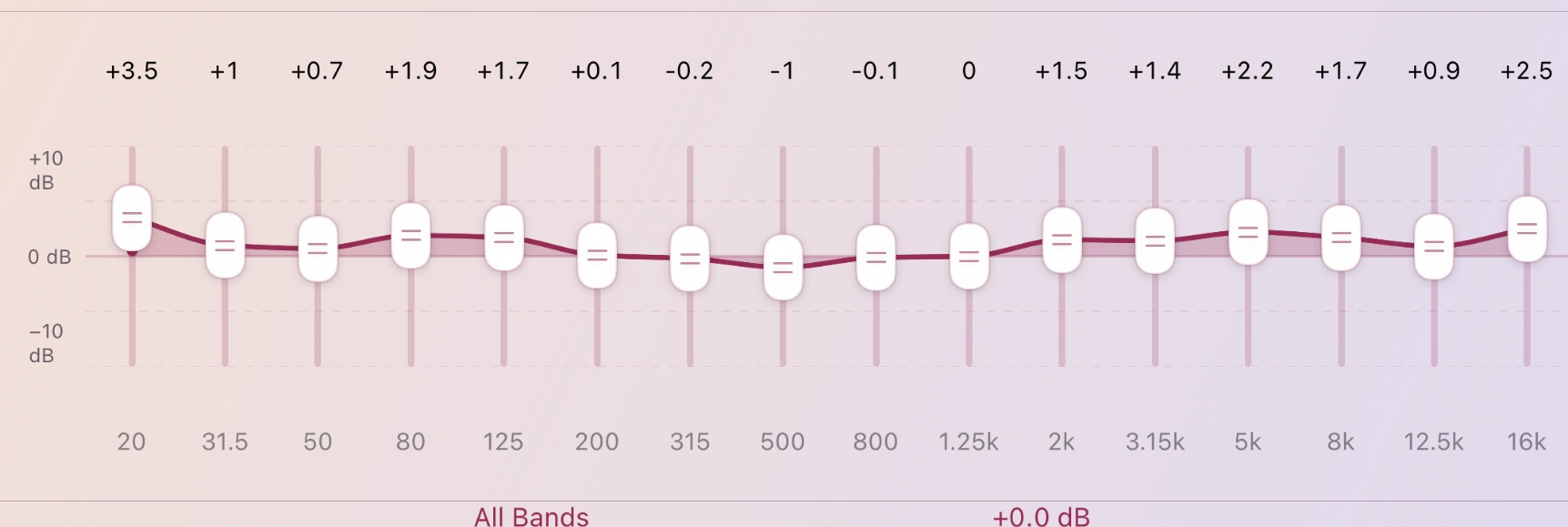
Actual RippleFX 16-band graphic EQ screen showing individual frequency adjustments
KNOW YOUR OPTIONS

Spotify’s equalizer and RippleFX: what’s the difference?

Spotify includes an equalizer in its iPhone app. That is a good starting point for shaping bass and treble. RippleFX offers a separate set of audio effects for supported Spotify playback routed through RippleFX.

BUILT INTO YOUR MUSIC APP

Spotify’s built-in EQ

In Spotify, open your profile, choose Settings and privacy → Playback → Equalizer. You can choose an EQ preset or adjust its frequency controls.

  • Convenient controls inside Spotify
  • Adjust bass and treble with the built-in equalizer
  • No need to change your audio output just to use Spotify’s own EQ
WITH RIPPLEFX

What RippleFX adds

Once RippleFX is selected as the available audio output, use its own tools to shape Spotify playback.

  • 8-band or detailed 16-band graphic EQ and presets
  • Deep, Sub, Punchy and Balanced bass modes with intensity control
  • AutoEQ headphone tuning, Spatial Surround, Reverb, Pitch and Preamp

Reference: Spotify’s official equalizer help. Menu options can change with app updates.

AUDIO OUTPUT SETUP

How to use RippleFX with Spotify on iPhone

RippleFX does not automatically alter every app’s sound. First, select RippleFX as the audio output.

  1. 01

    Start a song in Spotify

    Open Spotify on your iPhone or iPad and play music.

  2. 02

    Choose RippleFX as your output

    In Control Center, open AirPlay / the audio-output picker and select RippleFX.

  3. 03

    Turn RippleFX On

    Return to RippleFX, enable the RippleFX On switch, and adjust Bass Boost, Equalizer or other effects.

Important: Spotify Connect playback to a separate device is not the same as routing local playback through RippleFX. Choose RippleFX in the iPhone audio-output picker for the supported route. Results may vary depending on the playback destination and device. Read the complete setup guide.
A SOUND THAT FITS YOU

Make Spotify sound the way you like

Choose the effects you want. Start gently, listen, and adjust to your own taste.

Bass Boost

More bass, with control

Add weight to low frequencies with Deep, Sub, Punchy or Balanced bass profiles. Start with modest intensity and adjust by ear.

Graphic equalizer

Shape a mix, not just a preset

Use the 8-band EQ for fast changes or the 16-band EQ to fine-tune bass, mids and highs. Save a setting you enjoy.

AutoEQ

Tune for your headphones

Apply a supported AutoEQ headphone profile, then customize with EQ, Reverb or Spatial Surround if desired.

COMMON QUESTIONS

Good to know.

Practical answers about using RippleFX with Spotify.

Using Apple Music? Explore the Apple Music equalizer guide ↗

Explore more services: Apple Music guide Spotify guide Amazon Music guide TIDAL guide Deezer guide

Does Spotify already have an equalizer?

Yes. Spotify has an equalizer inside Settings and privacy → Playback → Equalizer. RippleFX is an additional audio-enhancement app with its own bass, EQ and effects controls.

Do I need to select RippleFX for Spotify music?

Yes. Begin Spotify playback, select RippleFX as the available audio output in Control Center, then enable RippleFX On and the effects you want.

Can I use Bass Boost and AutoEQ with Spotify?

Yes, when Spotify playback is routed through RippleFX, you can use its Bass Boost, graphic EQ, AutoEQ and other supported effects.

Will RippleFX change Spotify music files or my playlists?

No. RippleFX works with routed audio during playback; it does not edit songs or change playlists in your Spotify account.

Is RippleFX free to try?

Every new installation includes seven days of full feature access without a subscription trial signup. After that, you can still use all effects for ten minutes daily for free. Monthly and lifetime options are available if you want unlimited access.

RippleFX app icon
RIPPLEFX BY SARANGAUDIO

More control. More of your music.

Enhance audio from supported music apps with personalized EQ, bass and headphone effects on iPhone and iPad.

Download on the App Store