
RIPPLEFX + AMAZON MUSIC · IPHONE & IPAD

Make Amazon Music sound more like you.

Amazon Music listeners can explore extra sound customization with RippleFX when the playback output supports selecting RippleFX. See how the audio route works before adjusting bass, EQ and headphone tuning.

Bass Boost8 & 16-band EQHeadphone AutoEQSpatial Surround

7 days of full access. Then 10 minutes free every day. No automatic subscription.

Download on the App Store

Requires iOS 27 / iPadOS 27 or later. Audio must be routed through a supported connection. SarangAudio is not affiliated with Amazon Music.
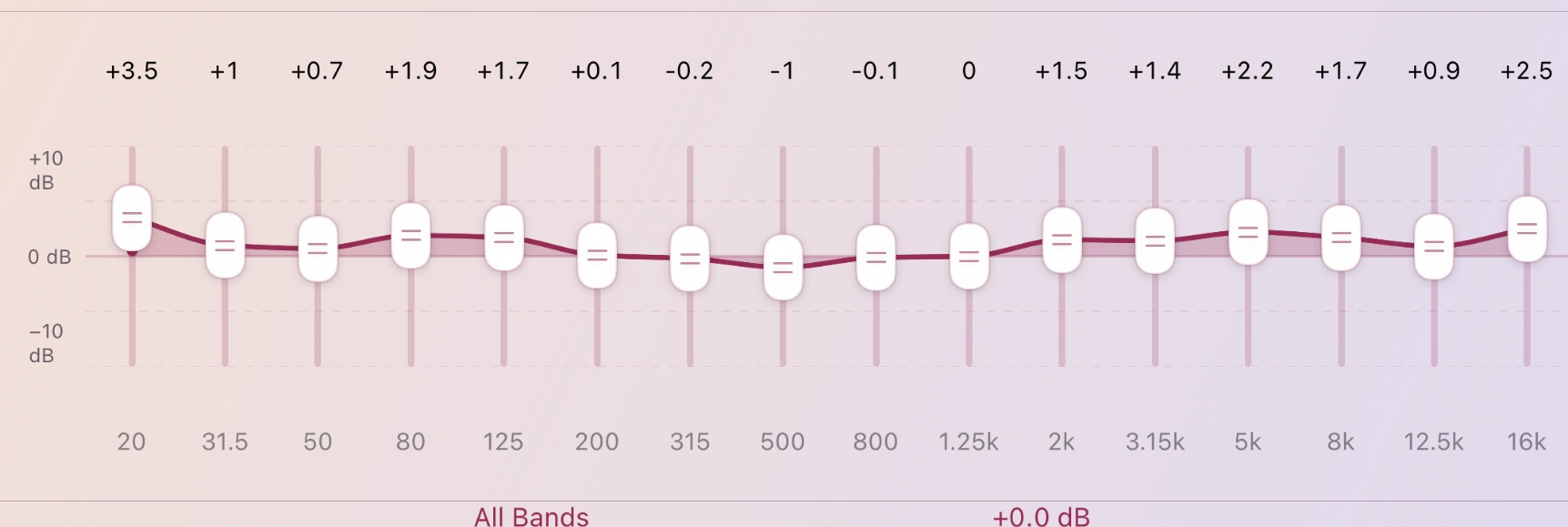
Actual RippleFX 16-band equalizer interface with individual frequency controls
KNOW YOUR OPTIONS

Amazon Music EQ on iPhone: start with the actual playback settings

Amazon Music offers playback-quality and device-related controls. The options available for sound adjustments can vary with your plan, device, app version and output route.

INSIDE AMAZON MUSIC

Amazon Music's sound options

  • Check the latest Amazon Music app settings for available sound and playback controls on your device.
  • Higher-quality streaming settings do not themselves replace a graphic equalizer.
  • External devices and cast-style playback may use a different audio path from the iPhone output picker.
WITH RIPPLEFX

A separate equalizer for supported routes

When Amazon Music playback is routed to RippleFX as an available audio output, you can control bass profiles, frequency bands and supported effects directly in RippleFX.

  • Choose a bass profile and fine-tune intensity.
  • Adjust an 8- or 16-band equalizer; save EQ presets.
  • Use supported headphone AutoEQ, Spatial Surround, Reverb and Pitch settings.
AUDIO ROUTING

How to try RippleFX with Amazon Music on iPhone

Choose the exact listening route first. RippleFX is not an automatic effect on every Amazon Music stream.

  1. 01

    Start music in Amazon Music

    Open Amazon Music on your iPhone or iPad and play a track using a supported playback method.

  2. 02

    Select RippleFX as your audio output

    Open Control Center, tap the AirPlay or audio-output picker, and choose RippleFX if it appears as an available destination.

  3. 03

    Switch on your preferred effects

    Return to RippleFX, enable the main RippleFX On switch and adjust Bass Boost, graphic EQ or other effects to taste.

Compatibility note: Amazon Music playback via external casting, other output devices, or special-quality modes can behave differently. No lossless/high-resolution output preservation is claimed by this guide. If RippleFX is not available in the audio-output picker, do not assume that the particular playback route is compatible. Read the full routing setup guide.
TUNE YOUR LISTENING

More control, shaped for your listening.

Experiment with these audio tools when the chosen output route supports RippleFX. Start with modest changes and adjust by ear.

Bass Boost

Give low notes more presence

Try Balanced for a gentle lift or Punchy for a stronger rhythmic emphasis, then adjust the intensity.

Custom EQ

Tune to different music styles

Use 8-band controls for simple changes or 16-band controls for more precise tuning and presets.

Headphone AutoEQ

Adapt to your headphones

Choose a supported headphone profile and personalize further with EQ and spatial settings.

COMMON QUESTIONS

Questions, answered.

What to know before you use RippleFX alongside Amazon Music.

Other music guides: Apple Music Spotify TIDAL Deezer

Does Amazon Music have an EQ on iPhone?

Available sound options depend on the Amazon Music app version and operating system. Check the app’s current settings for playback controls; RippleFX provides separate processing only on a compatible output route.

Can I use RippleFX on all Amazon Music playback devices?

No universal compatibility is claimed. Your iPhone must offer RippleFX as an audio output for that particular playback path.

Does RippleFX alter Amazon Music downloads or files?

No. RippleFX processes supported routed playback; it does not modify your Amazon Music library, downloads or account.

Can I use Bass Boost and AutoEQ together?

Yes, RippleFX lets you combine its audio effects during supported playback. Start with moderate settings to avoid excessive loudness.

Is RippleFX free to use?

Every installation begins with seven days of full feature access, with no subscription trial enrollment. Afterward, all effects remain accessible for ten minutes every day at no charge. Unlimited access is available through optional monthly or lifetime purchases.

RippleFX app icon
RIPPLEFX BY SARANGAUDIO

Your music, your sound.

Explore a flexible, precise equalizer for supported listening on iPhone and iPad.

Download on the App Store