
RIPPLEFX + DEEZER · IPHONE & IPAD

Find your Deezer sound.

Enjoy Deezer on iPhone with more control over bass, clarity and supported headphone tuning. RippleFX adds a separate audio effects toolkit when your Deezer playback route offers RippleFX as an audio-output destination.

Bass Boost8 & 16-band EQHeadphone AutoEQSpatial Surround

7 days of full access. Then 10 minutes free every day. No automatic subscription.

Download on the App Store

Requires iOS 27 / iPadOS 27 or later. Audio must be routed through a supported connection. SarangAudio is not affiliated with Deezer.
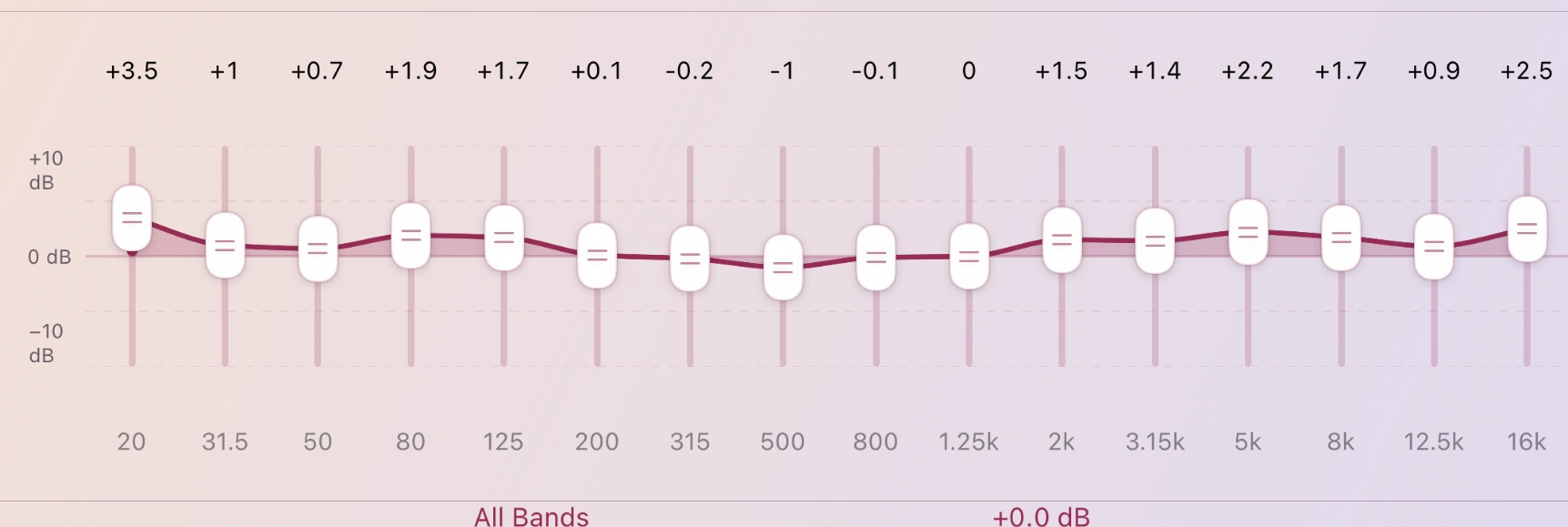
Actual RippleFX 16-band equalizer interface with individual frequency controls
KNOW YOUR OPTIONS

Deezer sound settings versus external EQ

Explore Deezer’s available audio-quality and sound options first. App controls, equalizer availability and supported playback outputs can change by app version, region and device.

INSIDE DEEZER

Deezer's sound options

  • Review Deezer playback settings to confirm sound and audio-quality options available on your iPhone.
  • Decide whether you want an app-level setting or extra personal tuning with RippleFX.
  • A selected Deezer destination such as an external streamer may bypass the same route used by local playback.
WITH RIPPLEFX

Your sound preferences, one effects panel

For Deezer playback that supports routing to RippleFX, combine bass modes, 8/16-band graphic equalization and optional headphone AutoEQ or spatial effects.

  • Choose a bass profile and fine-tune intensity.
  • Adjust an 8- or 16-band equalizer; save EQ presets.
  • Use supported headphone AutoEQ, Spatial Surround, Reverb and Pitch settings.
AUDIO ROUTING

How to try RippleFX with Deezer on iPhone

Start with a track you know and compare RippleFX On versus bypass at a comfortable level.

  1. 01

    Start music in Deezer

    Open Deezer on your iPhone or iPad and play a track using a supported playback method.

  2. 02

    Select RippleFX as your audio output

    Open Control Center, tap the AirPlay or audio-output picker, and choose RippleFX if it appears as an available destination.

  3. 03

    Switch on your preferred effects

    Return to RippleFX, enable the main RippleFX On switch and adjust Bass Boost, graphic EQ or other effects to taste.

Compatibility note: Deezer-specific output modes, external playback and certain quality settings may not expose RippleFX as a destination. Support depends on the current app, iOS version and chosen device. If RippleFX is not available in the audio-output picker, do not assume that the particular playback route is compatible. Read the full routing setup guide.
TUNE YOUR LISTENING

More control, shaped for your listening.

Experiment with these audio tools when the chosen output route supports RippleFX. Start with modest changes and adjust by ear.

Low frequencies

Adjust bass to your taste

Use Deep, Sub, Punchy or Balanced profiles, then reduce or raise intensity gradually.

Equalizer presets

Save a familiar sound

Customize your EQ curves for different headphones and listening moods without changing Deezer playlists.

Headphone tuning

Take the device into account

Apply AutoEQ for supported headphone models, then make final tweaks with manual EQ.

COMMON QUESTIONS

Questions, answered.

What to know before you use RippleFX alongside Deezer.

Other music guides: Apple Music Spotify Amazon Music TIDAL

Does Deezer already have a built-in equalizer?

The Deezer app and operating system may provide sound controls depending on the version, region and device. Check current Deezer settings; RippleFX supplies separate EQ effects on compatible routed audio.

Can RippleFX change audio on every Deezer device?

No. Only playback routes where RippleFX is offered as an output destination can use its effects.

Can I customize Deezer music without editing songs?

Yes. RippleFX changes supported playback audio processing, not the contents of your Deezer library or playlists.

What if RippleFX does not appear in Control Center?

Confirm that your device and iOS version meet RippleFX requirements, start playback, and inspect the audio picker. If no RippleFX output is shown for that route, it may not be compatible.

Is RippleFX free to use?

Every installation begins with seven days of full feature access, with no subscription trial enrollment. Afterward, all effects remain accessible for ten minutes every day at no charge. Unlimited access is available through optional monthly or lifetime purchases.

RippleFX app icon
RIPPLEFX BY SARANGAUDIO

Your music, your sound.

Explore a flexible, precise equalizer for supported listening on iPhone and iPad.

Download on the App Store